说明: This post is for daily record-keeping only. The normal approach is to follow the forum instructions for convenience and efficiency!
**new-api NodeLoc Login Integration Tutorial**2026-6-21
At first, the OAuth integration settings were as follows
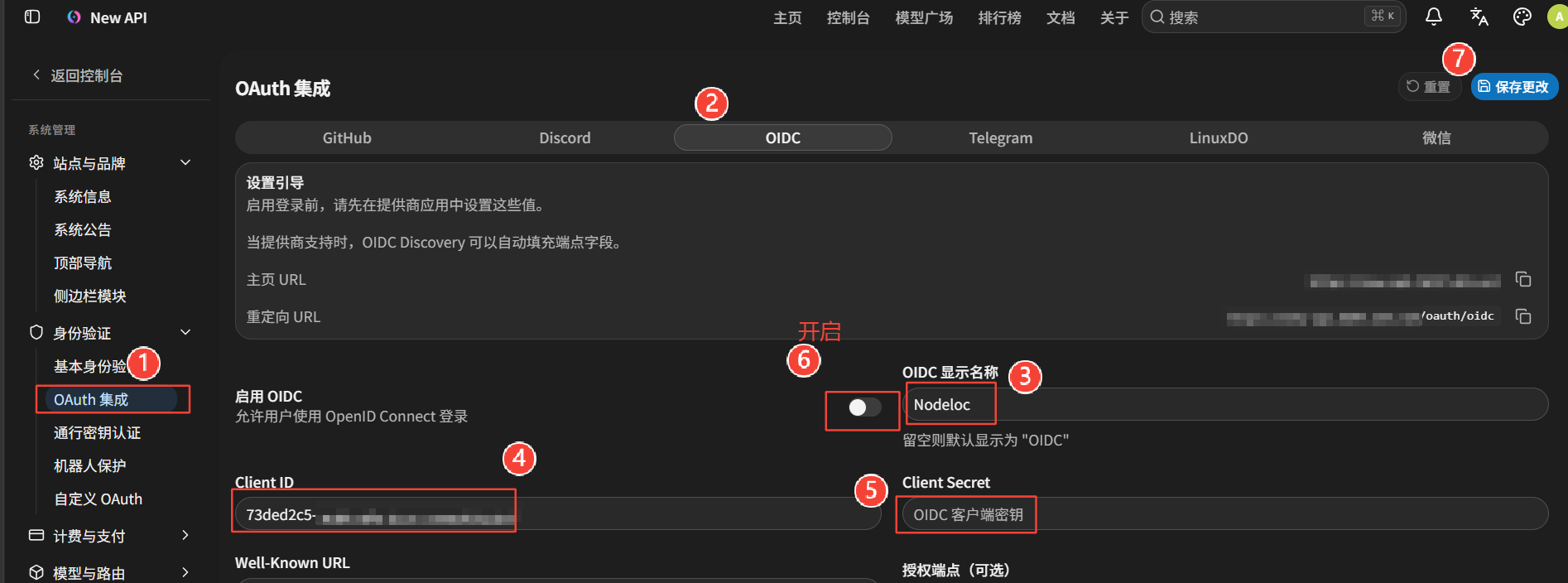
Question 1
new-api is deployed on a VPS. The main domain 2026.net is hosted on Cloudflare, while the subdomain new-api.2026.net points to the VPS IP. The orange-cloud proxy is enabled, with origin rules and port forwarding configured to enable HTTPS access. The SSL/TLS setting for the main domain 2026.net is Flexible. The new-api website is https://new-api.2026.net/
-
Apply for an application in the forum and obtain the Client ID and Client Secret.
-
In the OAuth integration OIDC default settings, set the Redirect URL to: the new-api website address/oauth/oidc
Bind the forum’s Client ID and Client Secret in the OAuth integration and save the settings.
Log in at https://new-api.2026.net/sign-in using a forum account for authorization. Clicking does nothing.
The browser’s F12 console shows ***omitted here***
Visit https://new-api.2026.net/**auth/oidc**
Testing returns Error 1016
Ray ID: a2f0d305e99dde8d • 2026-08-22 09:24:24 UTC
Origin DNS error
Qwen3.7-plus on the web replied:
Step 1: Check the Cloudflare DNS records
Step 2: Check the “origin port” configuration (Origin Rules)
Step 3: Verify that the SSL/TLS mode matches the VPS service
Step 4: Check the VPS firewall and the cloud provider’s security group
Step 5: Correct the OIDC Redirect URL (to prevent subsequent problems)
1. **In new-api’s system settings**:
The OIDC Redirect URL (Redirect URI) must be a **complete absolute path**.
2. **In the forum’s application management settings**:
The callback address (Callback URL / Redirect URI) must be **exactly identical** to the one entered in new-api (including `https://` and whether there is a trailing slash).
The first three steps were checked and found to be fine. The fourth step mainly checks whether the port is open and can initially be ignored.
Step five could be the problem, but new-api and the forum were carefully checked and found to match.
Question 2:
Direct access to https://new-api.2026.net works normally. However, when I click login and choose forum login, nothing happens, and the console shows no data transfer.
Since direct access to `https://new-api.2026.net` already works normally, this indicates that **Cloudflare DNS, origin port forwarding, and SSL/TLS configuration have all been successfully connected**. This is a crucial step!
The current issue is: **clicking “Forum Login” does nothing, and the Network panel does not show any new requests**. This usually means that **the frontend JavaScript encountered an error while executing the click event and failed silently**, or that **the frontend failed to read the OIDC configuration correctly** (for example, the Client ID is empty), so it cannot construct the authorization redirect URL.
Step 1: Rule out browser cache and extension interference (most common)
Step 2: Carefully verify the OIDC Redirect URL (Redirect URI)
Step 3: Check whether the new-api backend successfully loaded the OIDC configuration
Execute commands via SSH
Step 4: Check whether the forum’s OIDC endpoint URL is complete
Interlude:
On the new-api website, /system-settings/auth/basic-auth had “Registration enabled” set to off. I also restarted new-api, but opening the new-api website at /sign-up still showed that registration was available.
In fact, attempting to register displays “The administrator has disabled new user registration!”
## 1. Clear the browser cache and force-refresh
## 2. Check whether the database configuration was saved successfully
Log in to the VPS and inspect the new-api database: execute a series of commands via SSH.
## 3. Check whether environment variables are overriding the configuration
Check new-api’s Docker configuration or the `.env` file using the command.
## 4. Disable registration directly in the database
## 5. Check the new-api logs
## 6. Check whether there are multiple configuration locations
## Temporary solution: block access to the registration page directly
If none of the above methods work, Nginx can be used as a reverse proxy to intercept the registration page.
root@VPS:~# docker exec -it new-api-db mysql -u root -p
Error response from daemon: No such container: new-api-db
What the heck? It can’t find new-api-db!
Following guidance from the Qwen3.7-plus expert
Execute the command again:
root@VPS:~# docker exec new-api find / -name “*.db” 2>/dev/null
/data/one-api.db root@VPS:~# docker exec new-api find / -name “*.db” 2>/dev/null
/data/one-api.db
Why has the name changed to one-api.db???
Another series of commands,
Qwen3.7-plus replied:
Great! Your output clearly shows:
```text
PasswordRegisterEnabled|false
RegisterEnabled|false
```
This means that the registration switches in the database have successfully been set to `false` (disabled)!*
### Step 1: Check whether Cloudflare cached the old page (most common!)
### Step 2: Thoroughly check for hidden registration switches in the database
### Step 3: Confirm the database file path actually being read by the container
root@VPS:~# sqlite3 ./one-api.db “SELECT key, value FROM options WHERE lower(key) LIKE ‘%register%’;”
PasswordRegisterEnabled|false
RegisterEnabled|false
### Step 1: Verify the registration status actually read inside the container (most important)
### Step 2: Investigate Cloudflare page caching (very likely)
### Step 3: Confirm what exactly is meant by “registration is available”
### 1. Misunderstanding about “still being able to register”: it has actually been disabled successfully!
Look at these two lines in the data you provided:
- `“register_enabled”: false`
- `“password_register_enabled”: false`
**Conclusion**: Backend registration has **been successfully disabled 100%**! Your database modification has taken effect completely.
**Why can you still see the page?** Because New-API’s logic is that even if regular registration is disabled, the `/sign-up` page will still be displayed when third-party login (such as OIDC) is enabled. However, it will only show a button for “Log in with Nodeloc” and **will not** contain a username-and-password form. What you are seeing is the third-party authorization entry point, not the traditional registration form.
### 2. The core issue: why does clicking “Forum Login” do nothing?
Look at these key settings in your data:
```json
“oidc_enabled”: true,
“oidc_client_id”: “73ded2c5-********”,
“oidc_display_name”: “Nodeloc”,
“oidc_authorization_endpoint”: “”  The culprit is here!
After following the instructions, clicking “Log in with forum” redirects to https://2hkj2s.loc.rr.kg/oauth/authorize?client_id=73ded2c5-
Testing and tinkering with the Well-Known URL did not work.
Manually find Nodeloc forum’s actual OAuth endpoints
1. `HTTP/2 200` means that this Well-Known URL **really exists and is accessible**!
2. `x-discourse-route: discourse_auth_provider/oauth/openid_configuration` clearly tells us that **Nodeloc uses the Discourse forum software** and has configured the OIDC plugin.
Excellent! This JSON data is perfect and directly provides all the correct answers. This shows that **the OIDC configuration on the Nodeloc forum side is completely normal**.
The Authorization Endpoint, Token Endpoint, User Info Endpoint, and Redirect URI mentioned in Question 1.
root@VPS:~# curl -s https://2hkj2s.loc.rr.kg/.well-known/openid-configuration
Take the **exact addresses** extracted from the JSON and enter them into the corresponding fields:
-
**Authorization Endpoint**:
-
**Token Endpoint**:
-
**User Info Endpoint**:
A very important problem found
The first and second steps were followed exactly as above. Opening the site in the browser’s incognito mode and logging in through the Nodeloc forum still produced the same problem.
In Google Chrome’s incognito mode, F12 console shows GET https://2hkj2s.loc.rr.kg/**[u]oauth/authorize[/u]**?client_id=73ded2c5-
Look at this key line in the console:
`GET https://2hkj2s.loc.rr.kg/oauth/authorize?client_id=… 404 (Not Found)`
This shows that new-api is **still** trying to access the wrong address, `/oauth/authorize`, instead of the correct address we previously confirmed, `/oauth-provider/authorize` (note the `-provider` in the middle).
###  Force-correct the database configuration (be sure to execute this) Execute the command
**The problem is here**: the actual key name stored in the database contains dots `.** (for example, `oidc.authorization_endpoint`), while the SQL command I previously provided used underscores `_` (`oidc_authorization_endpoint`).
Another batch of commands to repair the database***
 **Excellent! The database has now been corrected perfectly!**
Your output clearly shows that all three endpoints now correctly point to paths containing `-provider`:
- `oidc.authorization_endpoint|https://2hkj2s.loc.rr.kg/oauth-provider/authorize\`
- `oidc.token_endpoint|https://2hkj2s.loc.rr.kg/oauth-provider/token\`
- `oidc.user_info_endpoint|https://2hkj2s.loc.rr.kg/oauth-provider/userinfo\`
Question: When logging in with Nodeloc, it says “Failed to start OIDC login”
429 (Too Many Requests)`
Wait 5–10 minutes.
The forum account is logged in in Google Chrome’s incognito mode. Visiting https://new-api.****/sign-in and logging in with Nodeloc still shows “OIDC token retrieval failed; please check the settings”.
Analyze the logs.
root@VPS:~# docker logs --tail 50 new-api
Look at this key error:
`[ERR] … | [OAuth-OIDC] ExchangeToken failed: empty access token`
root@VPS:~# curl -v -X POST “https://2hkj2s.loc.rr.kg/oauth-provider/token” \
The output of your `curl` command perfectly proves that **Nodeloc forum’s OIDC configuration is 100% correct**!
The forum successfully returned `HTTP/2 200` and provided complete `“access_token”` and `“id_token”` values. This means that your `Client ID`, `Client Secret`, `Code`, and `Redirect URI` all **match perfectly**!
The problem still exists. Execute the command again and update the database.
This log confirms that the problem is still stuck at `[OAuth-OIDC] ExchangeToken failed: empty access token`.
This indicates that new-api did send a request to the forum, but **did not receive a valid JSON response containing `access_token`**.
###  Step 1: Check whether environment variables are overriding the database configuration (very likely!)
### Step 2: Check whether `redirect_uri` has secretly been given a “fatal trailing slash”
### Step 3: Test the actual request inside the container (to verify whether Cloudflare is blocking it)
Execute commands to find the root cause of the server_address problem
root@VPS:~# # 1. Copy the database
docker cp new-api:/data/one-api.db /tmp/check_uri.db
# 2. View the callback address and server address configuration
sqlite3 /tmp/check_uri.db “SELECT key, value FROM options WHERE key IN (‘oidc_redirect_uri’, ‘server_address’, ‘oidc_client_id’, ‘oidc_client_secret’);”
Successfully copied 967kB (transferred 968kB) to /tmp/check_uri.db
### ASSISTANT
It appears that the `sqlite3` query returned no results. This is usually because the key names do not match exactly. However, this has revealed an extremely suspicious clue!
In the JSON data you provided earlier, there was one very important line:
`“server_address”: “http://localhost:3000”`
In New-API’s logic, if `server_address` is not correctly set to your actual domain, it may automatically construct an incorrect `redirect_uri` when requesting a token from the forum (for example, `http://localhost:3000/oauth/oidc\`).
The Nodeloc forum backend is configured with `https://new-api.2026.net/oauth/oidc\`.
These two addresses do not match, so the forum will directly reject the request, causing New-API to fail to obtain a token and report `empty access token`.
Then came another batch of commands.
Question: If server_address is the default “http://localhost:3000”, how can it be viewed or verified?
Another database check.
This query still returned no results, which is very important! It indicates that the New-API database does not store `server_address` or `oidc_redirect_uri` at all, or that they are stored in a very unusual location or under unusual key names.
# # 1. View the tables in the database
sqlite3 /tmp/verify.db “.tables”
# 2. View the first 10 entries in the options table (to see the exact key format)
sqlite3 /tmp/verify.db “SELECT key, value FROM options LIMIT 10;”
Look at the database output you provided. It contains no `oidc.authorization_endpoint`, `oidc.token_endpoint`, or `oidc.redirect_uri` keys at all!
Question: The homepage URL and website address cannot be modified
### Ultimate fix: modify the homepage URL directly through the database
Question: The server’s public URL, used for OAuth callbacks, Webhooks, and other external integrations—if this is changed, does the external link in open-webui also need to be changed?
root@VPS:~# docker logs --tail 50 new-api
This log is very interesting! It reveals several key details:
1. The `PUT /api/option/` at `20:18:01` returned `200`, indicating that you **successfully saved** the “server address” change!
2. The `GET /oauth/oidc?code=…` at `20:18:38` also returned `200`, indicating that New-API **successfully received** the authorization code (code) sent back from the forum.
**However, the log does not contain the `empty access token` error we saw earlier, nor any obvious `500` or `panic` error records.**
This usually means one of two things:
1. **The “500 Something went wrong” page was actually returned by the Nodeloc forum**, rather than by New-API.
2. New-API’s frontend received the data and then attempted to request another API (for example, to retrieve user information), but that API returned an error whose log was truncated or not recorded.
It finally works; new user registration still needs to be enabled
Summary: When searching the forum for relevant guides, I may not have found the correct version. After all this troubleshooting:
方案一: Record of this setup, OAuth integration with OIDC
-
Log in to the new-api website as an administrator and go to System Information → Server Address. It is empty by default; enter the new-api website address, for example http://new-api.2026.com.
-
In OAuth Integration → OIDC default settings, the default Redirect URL is: the new-api website address/oauth/oidc
After modifying Step 1, this Redirect URL becomes: http://new-api.2026.com/oauth/oidc
- Apply for an application at https://2hkj2s.loc.rr.kg/oauth-provider/applications, obtain the Client ID and Client Secret, and remember to save them in a text file. The Client Secret is displayed only once and can only be reset later. Enter the Redirect URL obtained in Step 1: http://new-api.2026.com/oauth/oidc
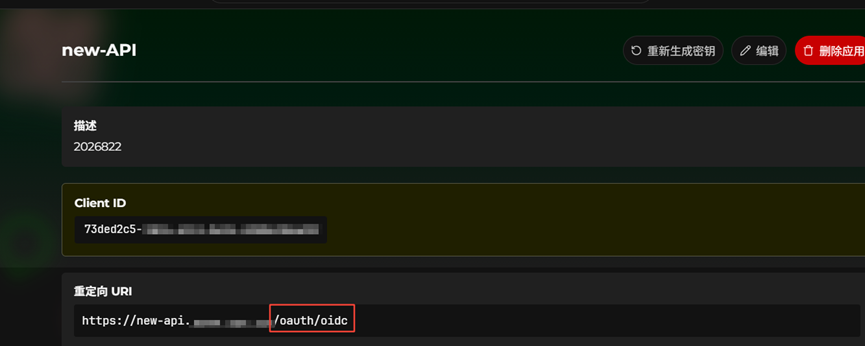
- In the new-api website, open OAuth Integration → OIDC.
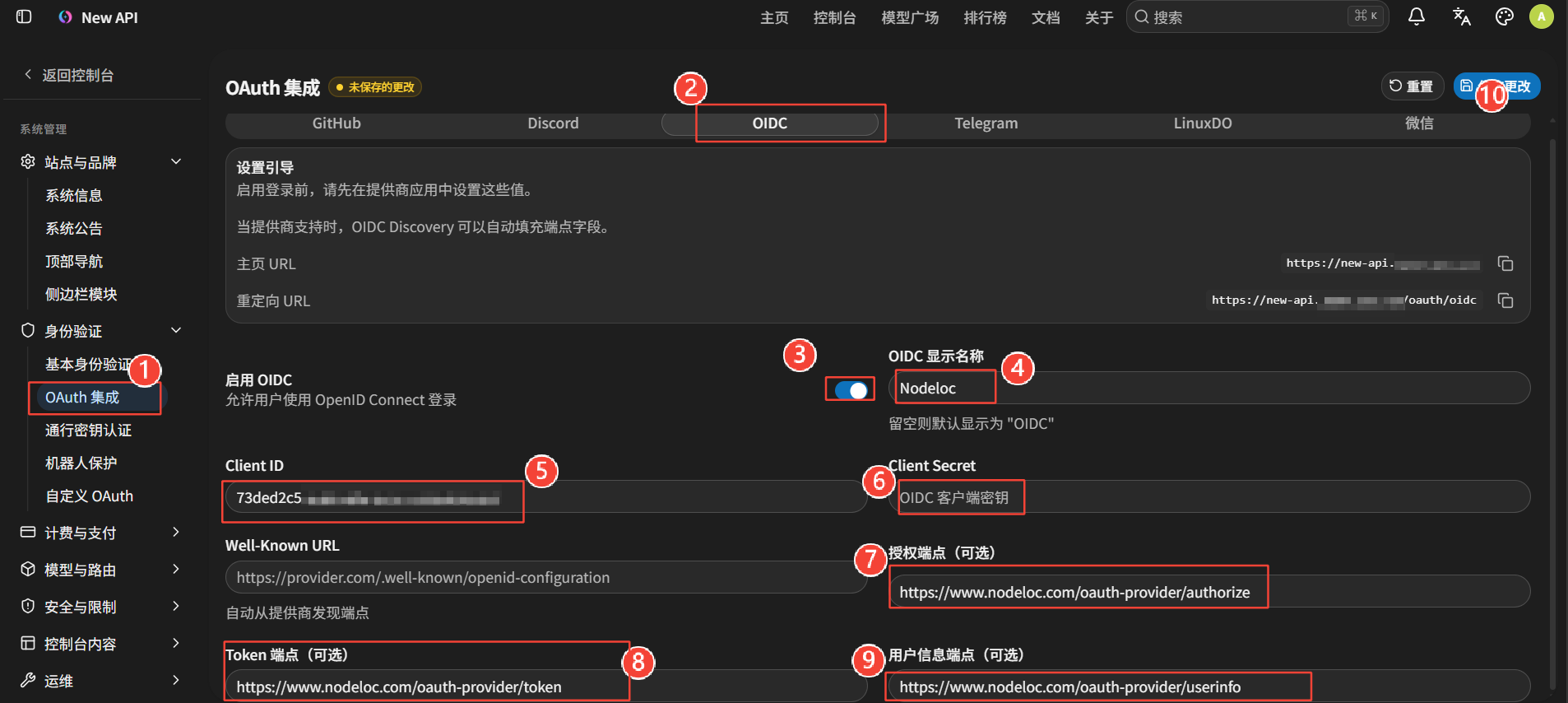
For the links, follow the Qwen3.7-plus expert’s instructions and execute this via SSH:
curl -s https://2hkj2s.loc.rr.kg/.well-known/openid-configuration
- Remember to enable user registration in new-api; configure the other settings according to your needs.
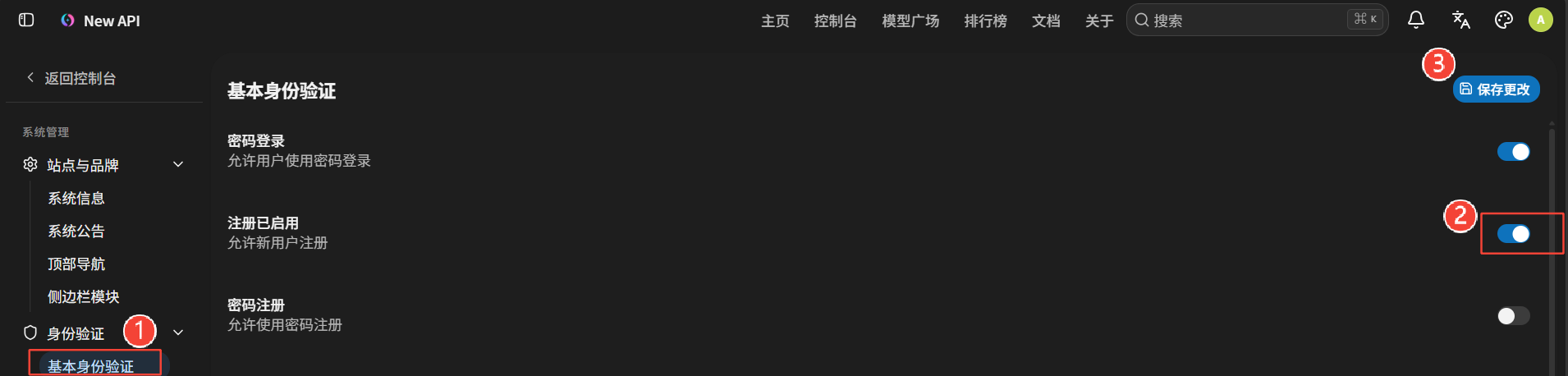
方案二: Custom OAuth Provider [Recommended]
Add an OAuth Provider
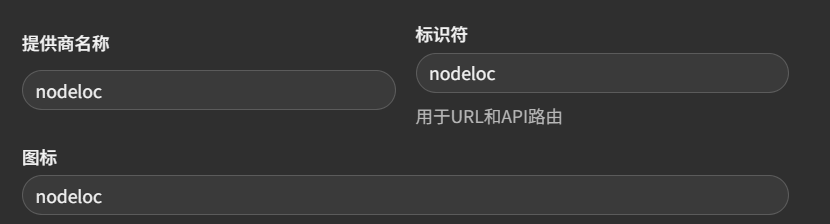
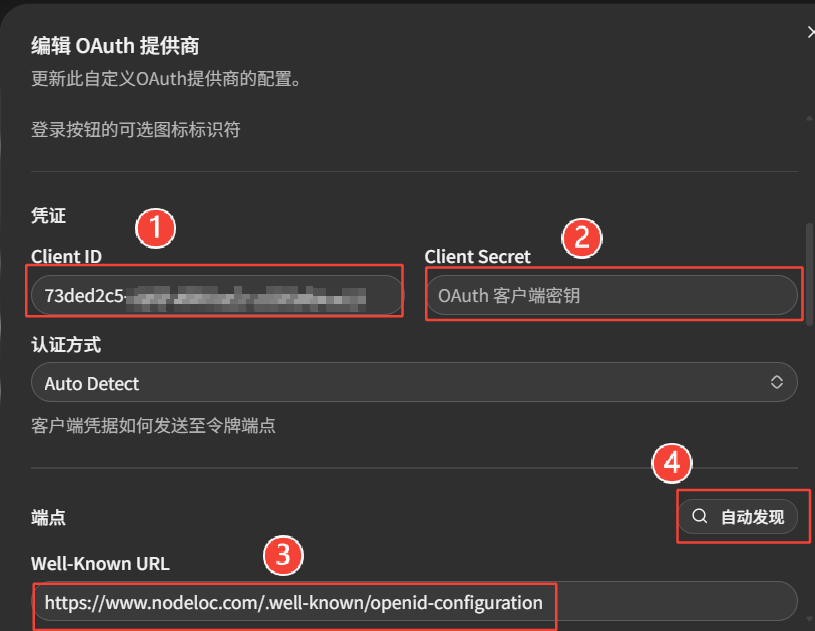
Reminder: You may still need to complete Step 1 of方案一. Otherwise, you may encounter the same kind of troubleshooting recorded here: the AI expert going around in circles, repeating database commands and various solutions, almost making me give up. Fortunately, I unexpectedly found the root cause and eventually succeeded in completing the integration!
For details, see **new-api NodeLoc Login Integration Tutorial**2026-6-21
Finally, this post is dedicated to thanking the Qwen3.7-plus expert and acknowledging my own persistence. After several hours of tinkering, it unexpectedly worked!