I transferred money using a UK card and personally confirmed that 1,643 PHP arrived. US and European cards can also be used, receiving 10 USD and EUR respectively (the card’s BIN is all that matters).
1. Preparation
1. Philippine Maya Bank
You can open an account with just a passport and a Philippine phone number; a home broadband connection isn’t required (you can access it directly). Tutorials are available online. Invitation code: @vexryx
Maya tutorial: Register for Maya Bank’s 50P bonus promotion, supporting low-cost Philippines subscriptions for Netflix, ChatGPT, and Xbox Pass - Business & Finance / Deals - NodeLoc
After opening the account, deposit 100 PHP to receive a 50 PHP newcomer bonus (you can transfer via Wise, or deposit cryptocurrency into Maya through Coins.ph. Never use Maya as proof of address when opening a Coins.ph account, or your account may be closed; LV2 is sufficient.)
2. Philippine eSIM
DITO / GlobeOne eSIMs; tutorials are available online.
It’s recommended to activate DITO first; only a passport is required (its signal is worse than Globe and Smart. If you’re using a white card + software switching and the switched-to DITO doesn’t receive verification codes, switch back and then switch again; this may fix the temporary SMS reception bug.)
After successfully opening a Maya Bank account, you can use Maya as proof of address to open a GlobeOne account.
3. Sendwave
Registration requires a phone number from the UK region (the phone number must correspond to the card’s region) + a passport. Rewards: UK number = GBP, US number = USD, European number = EUR.
Example: if you register with a UK phone number, you can only pay in GBP, and only with a UK bank card.
If you don’t have a UK bank card, you can look into 212, taptap (uncertain), Krak, SumUp, and Altery (untested). It’s currently known that Wirex-related virtual cards such as Coca and Pulsar also have UK BINs, but nobody has tested them yet. Since they’re virtual cards, they may trigger risk controls. (Credit cards cannot be used.)
If you don’t have a European bank card, you can look into 212 (EU region; residency may be required if you apply now, so it’s not recommended), Krak (EU region), Altery (untested), Bybit EU (untested), and others.
For now, it’s best not to use cryptocurrency with Sendwave. Unless you’re only trying to make a one-off deal to pocket £10, don’t use a virtual card.
- Important: Where to enter the invitation code
After registering and completing KYC, click the profile icon in the upper-left corner (Personal Center). There will be an option to enter a promo code. Enter my invitation code there: BXUPH
Be sure to enter the invitation code before topping up or transferring money; otherwise, the first-transfer credit that turns 10 into 20 will not take effect.
3. Linking Maya as the recipient
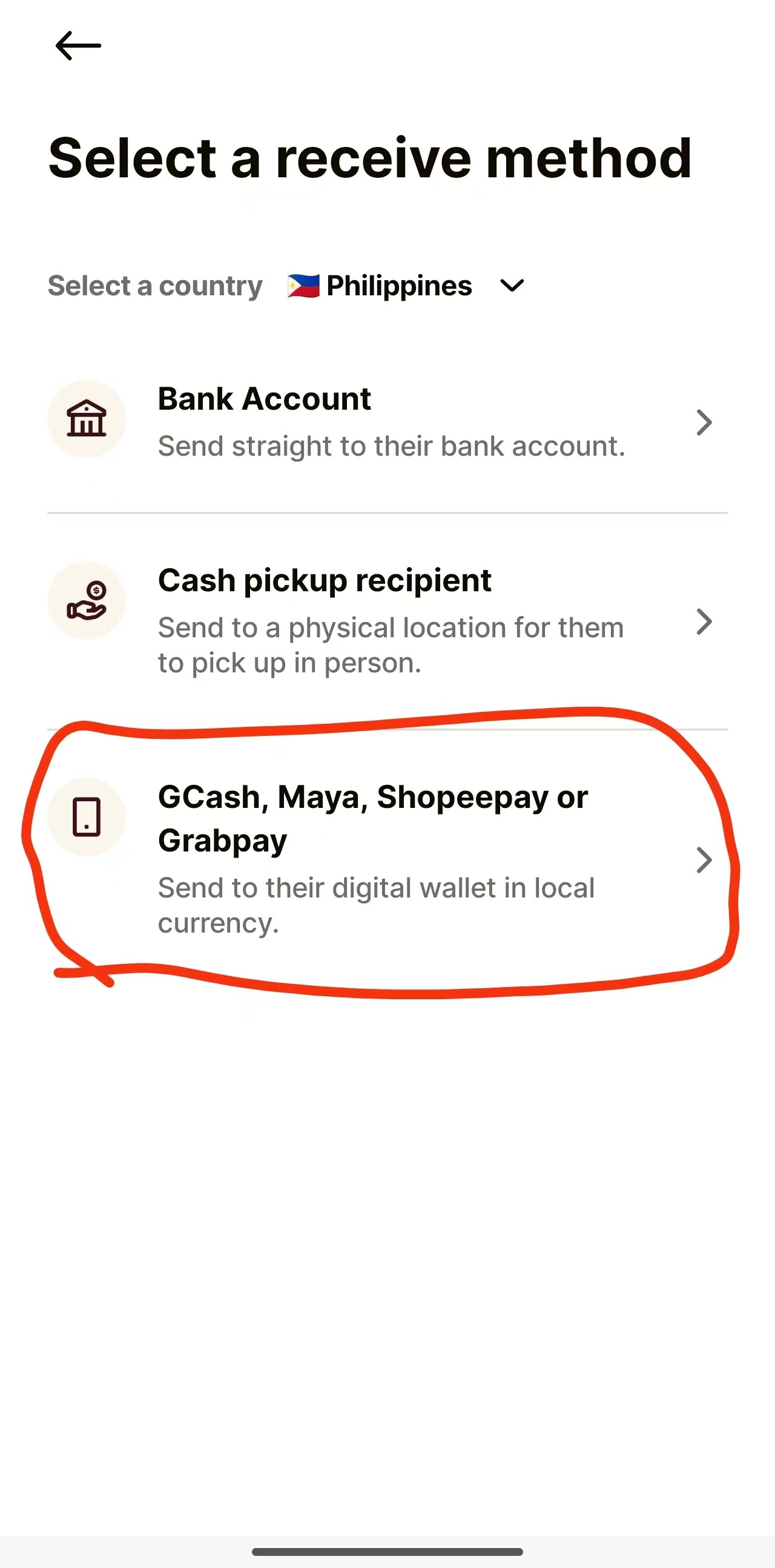
On the Sendwave home page, click Recipients - Add a new recipient and enter the following:
Select MAYA as the wallet type
The name registered with Maya
The phone number registered with Maya (starting with +63, in the format +63 000 000 0000)
Enter the phone number again
Enter your Philippine address in CITY; enter anything for STREET
Then click Save
- Transfer directly with a linked card or top up your Sendwave wallet first
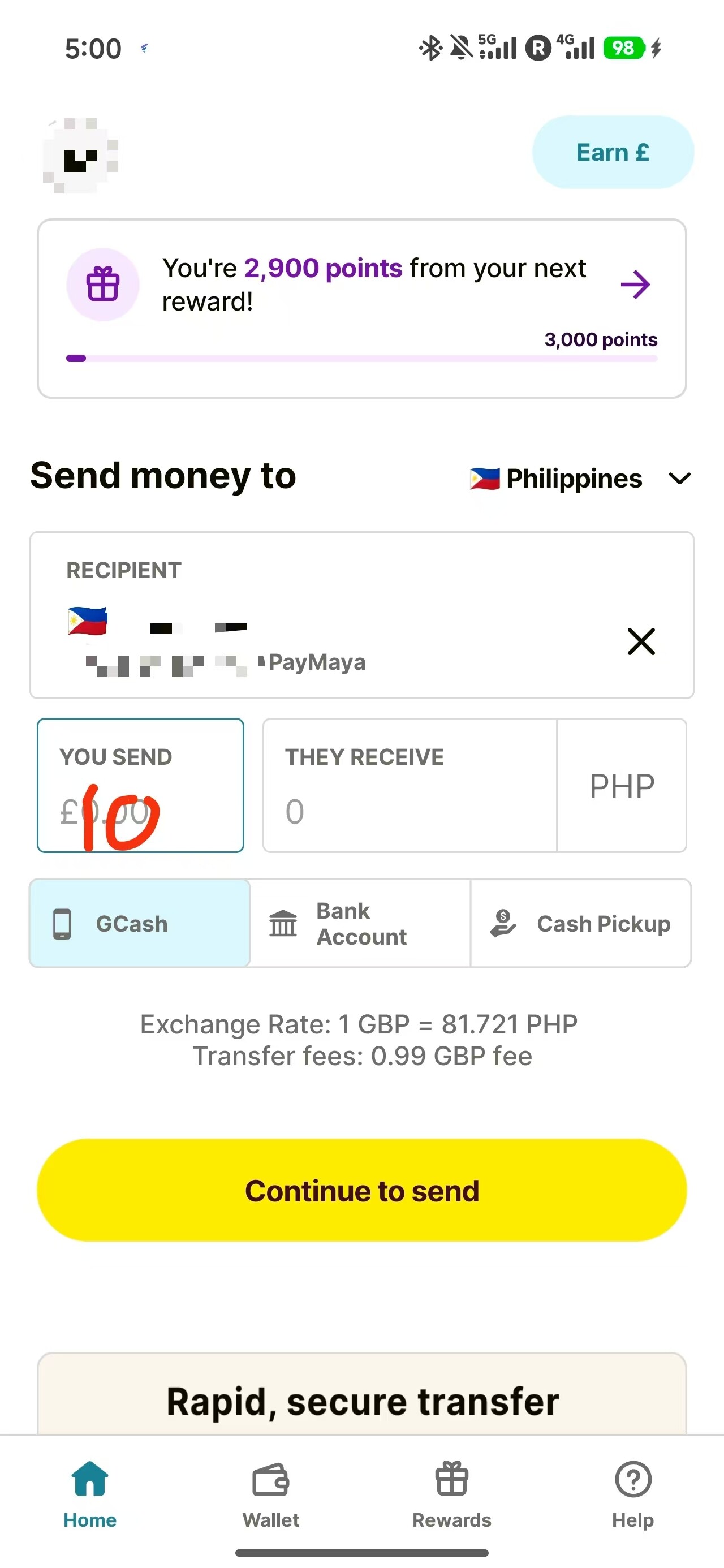
On the Sendwave home page, click Add cash and use your linked card or Apple Pay to add 10.99 USD/GBP/EUR (including the fixed 0.99 fee; enter 10 GBP when filling it out, and the bill will show 10.99).
Some users have reported that paying directly by card during a transfer can cause the transfer to fail because of risk controls. If you top up your Sendwave wallet first and then transfer using the wallet balance, it works. (In the UK, I personally confirmed that a directly linked SumUp card can also pay directly, so it ultimately depends on the bank card.)
After the top-up is complete, the My wallet option will appear.
5. Initiating the transfer
Enter a transfer amount of 10 GBP (or USD/EUR).
If you entered the invitation code BXUPH, it will display “10 credit will be applied to your next transfer”.
Finally, check the payment amount, the recipient amount (it should be the PHP equivalent of 20 GBP; 20 - 10.99 = 9.01 GBP) and whether the recipient’s account details are correct.
Once everything is correct, click confirm transfer.
After about 5 minutes, the transfer will be complete once the progress bar finishes.
6. After the money arrives
You’ll receive 1,643 PHP (the amount fluctuates with the exchange rate on the day). You can transfer the money to the Philippine Coins exchange and convert it to USDT for further circulation, earning a little more, or transfer it directly from Maya to Wise.
Maya can also later transfer money back to Wise (according to Wise’s website), but some people say that Maya cannot transfer funds if it has been used with cryptocurrency. If you’re worried about Wise’s risk controls, Maya can be used for low-price-region payments, such as Spotify. Generally, Maya’s source of funds can be accepted as long as it isn’t cryptocurrency, but proof of assets is required.
There’s also the new Philippine private bank SecBank. I saw someone say it was established in the 1970s, but the app has a strong AI feel and the KYC process is strange, so if you’re concerned about personal information, you may want to avoid opening an account. As far as I can tell, it doesn’t involve cryptocurrency, and instant transfers are free, while Maya charges 10 PHP.
I’ll later try to see whether money can be transferred to PIX and update everyone if I get results.
Feel free to leave a comment if you have any questions.
If you have any questions, feel free to leave a comment.