Is this one of those bugs that happens every time Codex gets updated?
After the update, it really became like this—it’s now customizable.
1 Like
No idea, but bumping the post to help.
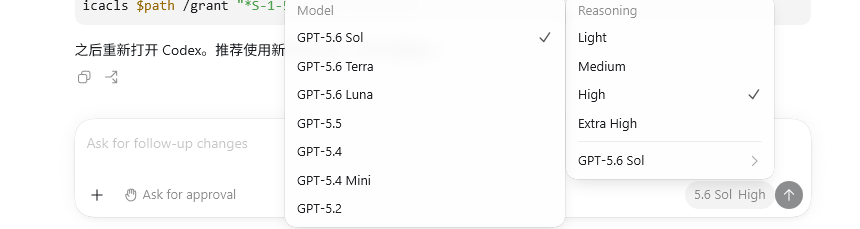
It’s the same, but you can also use it if you write it in the config file.
If it shows up, just use it directly; if it doesn’t, changing the settings won’t work—let AI handle it.
1 Like
Custom display—just make do with it for now.
This will definitely get fixed.
1 Like
Same here — I can only use historical sessions in the CLI now.
My Plus doesn’t have 5.6 sol.
It seems like it’s always like this—just wait a couple of days and it’ll be there. It doesn’t affect anything in the settings.
How do I set it up? Mine doesn’t show either.
With Codex ++, you can display it: GitHub - BigPizzaV3/CodexPlusPlus: An enhanced tool for CodexApp, striving to make Codex better to use and more comfortable 一个CodexApp的增强工具,努力让Codex变得更好用更舒服 · GitHub
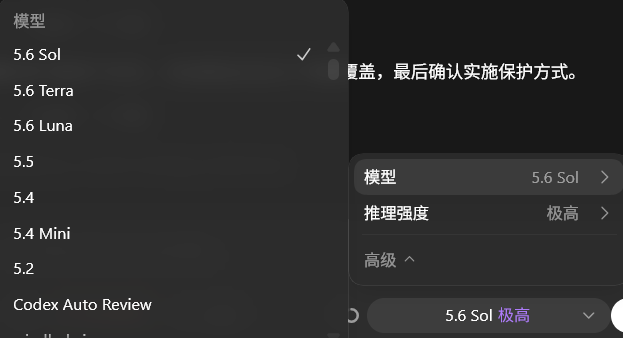
Just change the previous 5.5 in config.toml to model = “gpt-5.6-sol”
review_model = “gpt-5.6-sol” and that’s it.
1 Like
Why isn’t it showing up? Is the configuration wrong? My API login call, 5.6 Sol, works pretty well.
It shows as “Custom.” The AI says it isn’t displayed because the configured provider is “customer.” I guess we’ll have to wait for the next version to fix it, right?

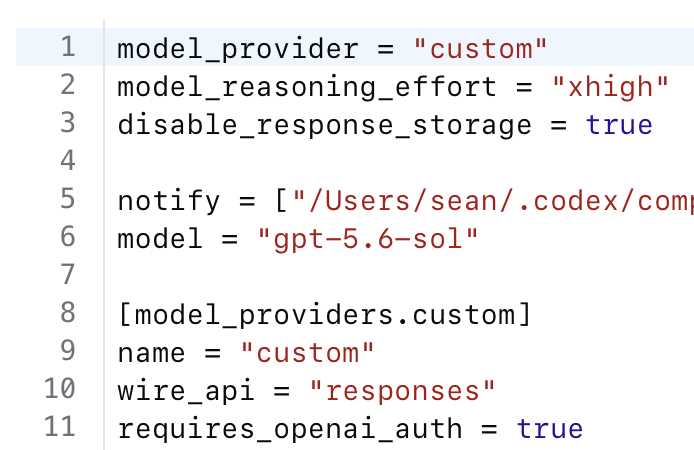
I don’t see what the problem is.
Can be configured